Node.js Backend Basics Tutorial for Developers
This Node.js backend basics tutorial focuses on building a small but realistic HTTP API with modern Node.js. You will create an Express server, add routes, validate JSON input, connect to MariaDB and return JSON responses that can be consumed by React, mobile apps or other services.
In this Node.js tutorial you will:
- Understand how Node.js fits into a typical backend stack
- Initialize a Node.js project with npm
- Build an Express server with basic routing and middleware
- Connect to MariaDB with a popular driver and run parameterized queries
- Return clean JSON responses and basic error handling
To see Node.js in context, pair this article with:
Linux basics for developers,
MariaDB tutorial for developers,
SQL basics tutorial,
Git version control tutorial,
CI/CD pipeline tutorial,
and the front-end side in the
React components basics tutorial.
For reference, keep the
official Node.js documentation
and the
Express docs
open in another tab.
1. Node.js backend basics: where Node fits
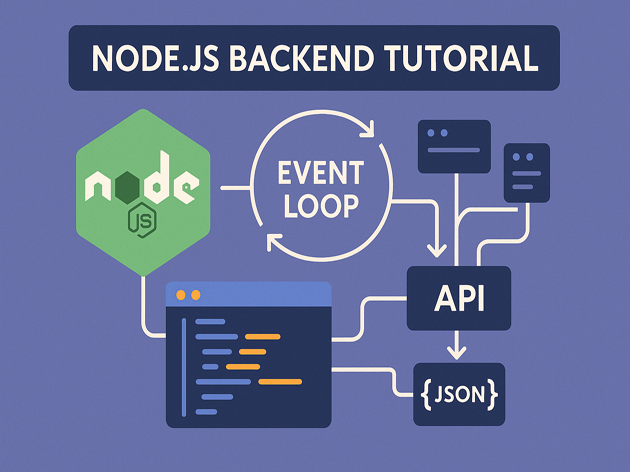
Node.js is a JavaScript runtime built on V8. It allows you to run JavaScript on the server. In a typical architecture:
- The browser or client sends HTTP requests.
- A reverse proxy (Nginx, Apache) forwards requests to a Node.js process.
- Node.js runs your Express app, which handles routing, validation and data access.
- The app talks to databases like MariaDB, message queues or external APIs and sends back JSON or HTML.
This Node.js backend basics tutorial focuses on the Node.js and Express layer, plus a direct connection to MariaDB so you can build something end-to-end.
2. Initialize a Node.js project
First, create a project folder and initialize it with npm. This gives you a package.json to track dependencies and scripts.
2.1 Project setup
mkdir node-backend-demo
cd node-backend-demo

npm init -y

npm install express mysql2 dotenv
Here we install:
express– minimal web frameworkmysql2– MariaDB/MySQL driver that supports promisesdotenv– loads environment variables from a.envfile
2.2 Basic folder layout
A simple layout for this Node.js backend basics tutorial:
node-backend-demo/
  package.json
  .env
  src/
    server.js
    db.js
    routes.js
3. Build an Express server
Now we create a minimal Express server that exposes a health endpoint and a stub for notes.
3.1 server.js
Create src/server.js:
import express from "express";
import dotenv from "dotenv";
import { router as notesRouter } from "./routes.js";

dotenv.config();

const app = express();
const port = process.env.PORT || 3000;

app.use(express.json());

app.get("/health", (req, res) => {
  res.json({ status: "ok" });
});

app.use("/notes", notesRouter);

app.use((err, req, res, next) => {
  console.error(err);
  res.status(500).json({ error: "Internal server error" });
});

app.listen(port, () => {
  console.log(`Node.js backend basics tutorial API on http://localhost:${port}`);
});
The server sets up JSON parsing, a health endpoint, a notes router and a simple error handler.
3.2 Enable ES modules
In package.json, add "type": "module" so you can use import syntax:
{
  "name": "node-backend-demo",
  "version": "1.0.0",
  "type": "module",
  "main": "src/server.js",
  "scripts": {
    "start": "node src/server.js"
  },
  "dependencies": {
    "dotenv": "^16.0.0",
    "express": "^4.19.0",
    "mysql2": "^3.9.0"
  }
}
4. Connect Node.js to MariaDB
Next, this Node.js backend basics tutorial wires the API to a real database using mysql2 in promise mode.
4.1 Database helper
Create src/db.js:
import mysql from "mysql2/promise";
import dotenv from "dotenv";

dotenv.config();

let pool;

export function getPool() {
  if (!pool) {
    pool = mysql.createPool({
      host: process.env.DB_HOST || "127.0.0.1",
      user: process.env.DB_USER || "demo_user",
      password: process.env.DB_PASS || "demo_pass",
      database: process.env.DB_NAME || "node_demo",
      waitForConnections: true,
      connectionLimit: 10,
    });
  }
  return pool;
}
4.2 .env configuration
Create a .env file at project root (never commit production secrets):
PORT=3000
DB_HOST=127.0.0.1
DB_USER=demo_user
DB_PASS=demo_pass
DB_NAME=node_demo
4.3 Database schema
Reusing the theme from the SQL basics and MariaDB tutorials, create a simple notes table:
CREATE DATABASE node_demo
  CHARACTER SET utf8mb4
  COLLATE utf8mb4_unicode_ci;

CREATE USER 'demo_user'@'localhost' IDENTIFIED BY 'demo_pass';
GRANT ALL PRIVILEGES ON node_demo.* TO 'demo_user'@'localhost';

USE node_demo;

CREATE TABLE notes (
  id          BIGINT UNSIGNED NOT NULL AUTO_INCREMENT,
  title       VARCHAR(255) NOT NULL,
  body        TEXT,
  created_at  DATETIME NOT NULL DEFAULT CURRENT_TIMESTAMP,
  PRIMARY KEY (id)
);
5. Implement Node.js routes for a JSON API
Now we give the Node.js backend basics tutorial something real to do: a tiny JSON API for listing and creating notes.
5.1 Routes module
Create src/routes.js:
import express from "express";
import { getPool } from "./db.js";

export const router = express.Router();

router.get("/", async (req, res, next) => {
  try {
    const pool = getPool();
    const [rows] = await pool.query(
      "SELECT id, title, created_at FROM notes ORDER BY created_at DESC"
    );
    res.json(rows);
  } catch (err) {
    next(err);
  }
});

router.post("/", async (req, res, next) => {
  try {
    const { title, body } = req.body;

    if (!title || typeof title !== "string") {
      return res.status(422).json({ error: "Title is required" });
    }

    const pool = getPool();
    const [result] = await pool.execute(
      "INSERT INTO notes (title, body) VALUES (?, ?)",
      [title, body || null]
    );

    res.status(201).json({
      id: result.insertId,
      title,
      body: body || null,
      created_at: new Date().toISOString().slice(0, 19).replace("T", " "),
    });
  } catch (err) {
    next(err);
  }
});
Notice how prepared statements with placeholders (?) keep SQL injection risks under control.
5.2 Start the Node.js backend and test
Run the server:
npm startThen test with curl:
# health
curl http://localhost:3000/health

# list notes (initially empty)
curl http://localhost:3000/notes

# create a note
curl -X POST http://localhost:3000/notes \
  -H "Content-Type: application/json" \
  -d '{"title": "First Node note", "body": "Hello from Node.js backend basics tutorial"}'
This gives you a working Node.js backend that stores data in MariaDB and serves JSON – a foundation you can connect to React, mobile apps or other services.
6. Compact Node.js backend cheat sheet
To wrap up this Node.js backend basics tutorial, here is a small cheat sheet summarizing the key concepts and tools you just used.
| Area | Examples | Purpose | Relative Usage |
|---|---|---|---|
| Runtime | node, npm |
Run and manage Node.js apps | |
| Web framework | express(), routes, middleware |
Handle HTTP requests and responses | |
| Database | mysql2/promise, prepared queries |
Talk to MariaDB / MySQL safely | |
| Config | .env, dotenv |
Manage credentials and ports | |
| Observability | console.log, 500 handler |
Debug and handle errors |
With these Node.js backend basics in place, you can confidently read existing codebases, expose new APIs, integrate with SQL databases and tie Node.js into the broader platform that includes Linux, Git, CI/CD, MariaDB and front-end frameworks like React.