PHP Backend Basics Tutorial for Developers
This PHP backend basics tutorial shows how to build a small but realistic HTTP backend with modern PHP. Instead of stopping at echo "Hello World", we will create a tiny router, handle JSON requests, connect to a MariaDB database with PDO, and return JSON responses that a front end or mobile app can consume.
In this PHP tutorial you will:
- Understand how PHP fits into a typical backend stack
- Run a local PHP development server
- Implement a simple router and controller functions
- Connect to MariaDB with PDO and run parameterized queries
- Expose a JSON API endpoint for basic CRUD operations
For related topics, pair this guide with the
Linux basics for developers,
MariaDB tutorial for developers,
SQL basics tutorial,
Git version control tutorial,
CI/CD pipeline tutorial,
and the
Adobe Commerce Magento 2 tutorial.
For language reference and built-in functions, keep the
official PHP manual
open in another tab.
1. PHP backend basics tutorial: where PHP sits in the stack
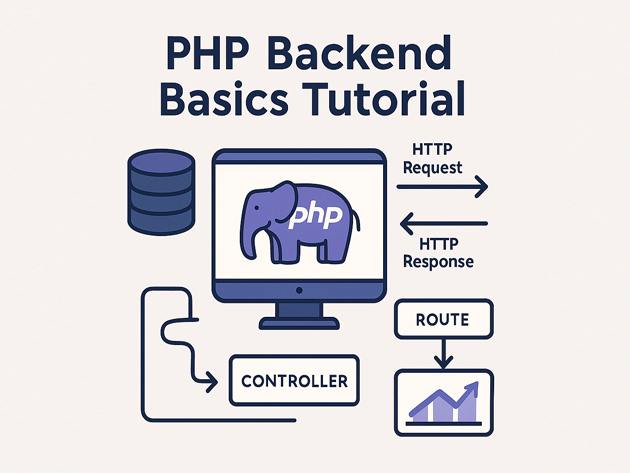
PHP is a server-side language that runs inside a web server (Apache, Nginx + PHP-FPM) or its own built-in server. In a typical architecture:
- The browser or client sends an HTTP request.
- The web server forwards the request to PHP.
- PHP runs your code, talks to databases and other services, and builds a response.
- The response returns as HTML or JSON.
This tutorial focuses on the backend part: routing, reading input, talking to MariaDB (or MySQL) and returning JSON.
2. Run PHP locally with the built-in server
Modern PHP ships with a built-in development server that is perfect for experimenting with backend code.
2.1 Project structure
Create a small project folder:
mkdir php-backend-demo
cd php-backend-demo

mkdir public src
Create a minimal front controller file at public/index.php:
<?php
declare(strict_types=1);

header('Content-Type: application/json; charset=utf-8');

echo json_encode([
    'message' => 'Hello from PHP backend basics tutorial',
]);
2.2 Start the dev server
php -S localhost:8000 -t publicVisit http://localhost:8000 in your browser and you should see a small JSON response. That confirms your PHP backend is running.
3. Add a simple router in PHP
Instead of putting all logic in one file, this PHP backend basics tutorial adds a tiny router that maps paths to controller functions. This is not a full framework, but it’s enough to model how frameworks behave internally.
3.1 Front controller with routing
Replace public/index.php with:
<?php
declare(strict_types=1);

require __DIR__ . '/../src/bootstrap.php';

$path = parse_url($_SERVER['REQUEST_URI'], PHP_URL_PATH);
$method = $_SERVER['REQUEST_METHOD'] ?? 'GET';

header('Content-Type: application/json; charset=utf-8');

if ($path === '/health') {
    echo json_encode(['status' => 'ok']);
    exit;
}

if ($path === '/notes' && $method === 'GET') {
    echo json_encode(list_notes());
    exit;
}

if ($path === '/notes' && $method === 'POST') {
    $body = json_decode(file_get_contents('php://input'), true) ?? [];
    echo json_encode(create_note($body));
    exit;
}

http_response_code(404);
echo json_encode(['error' => 'Not found']);
This script inspects the request path and method, then calls simple functions (which we’ll add next) for each route.
4. Configure database access with PDO
Next, this PHP backend basics tutorial connects the PHP backend to MariaDB using PDO, which works with most SQL databases and supports prepared statements.
4.1 Create a bootstrap file
Create src/bootstrap.php with connection logic and simple helpers:
<?php
declare(strict_types=1);

function db(): PDO
{
    static $pdo = null;

    if ($pdo instanceof PDO) {
        return $pdo;
    }

    $dsn = 'mysql:host=127.0.0.1;dbname=php_backend_demo;charset=utf8mb4';
    $user = 'demo_user';
    $pass = 'demo_pass';

    $pdo = new PDO($dsn, $user, $pass, [
        PDO::ATTR_ERRMODE            => PDO::ERRMODE_EXCEPTION,
        PDO::ATTR_DEFAULT_FETCH_MODE => PDO::FETCH_ASSOC,
    ]);

    return $pdo;
}

function list_notes(): array
{
    $stmt = db()->query('SELECT id, title, created_at FROM notes ORDER BY created_at DESC');
    return $stmt->fetchAll();
}

function create_note(array $data): array
{
    $title = $data['title'] ?? '';
    $body  = $data['body'] ?? '';

    if ($title === '') {
        http_response_code(422);
        return ['error' => 'Title is required'];
    }

    $stmt = db()->prepare(
        'INSERT INTO notes (title, body) VALUES (:title, :body)'
    );
    $stmt->execute([
        ':title' => $title,
        ':body'  => $body,
    ]);

    return [
        'id'         => (int) db()->lastInsertId(),
        'title'      => $title,
        'body'       => $body,
        'created_at' => (new DateTimeImmutable())->format('Y-m-d H:i:s'),
    ];
}
This provides a single db() helper for creating and reusing the PDO connection and basic data access functions.
4.2 Create the database schema
Use the same MariaDB instance you created in the MariaDB tutorial, or create a new one:
CREATE DATABASE php_backend_demo
  CHARACTER SET utf8mb4
  COLLATE utf8mb4_unicode_ci;

CREATE USER 'demo_user'@'localhost' IDENTIFIED BY 'demo_pass';
GRANT ALL PRIVILEGES ON php_backend_demo.* TO 'demo_user'@'localhost';

USE php_backend_demo;

CREATE TABLE notes (
  id          BIGINT UNSIGNED NOT NULL AUTO_INCREMENT,
  title       VARCHAR(255) NOT NULL,
  body        TEXT,
  created_at  DATETIME NOT NULL DEFAULT CURRENT_TIMESTAMP,
  PRIMARY KEY (id)
);
Update connection credentials in bootstrap.php if needed.
5. Test the PHP JSON API
Now that routing and database access are in place, this section of the PHP backend basics tutorial shows how to exercise the API using curl. Keep the PHP dev server running:
php -S localhost:8000 -t public5.1 Health endpoint
curl http://localhost:8000/health
# {"status":"ok"}
5.2 List notes
curl http://localhost:8000/notes
# [] on first run
5.3 Create a note
curl -X POST http://localhost:8000/notes \
  -H "Content-Type: application/json" \
  -d '{"title":"First note","body":"Hello from PHP backend basics tutorial"}'
Then list notes again to verify that the new row is stored in MariaDB and returned through your PHP API.
6. Minimal error handling and configuration tips
To keep this PHP backend basics tutorial focused, we only need a few configuration improvements for local development.
6.1 Enable error reporting in dev
At the top of public/index.php (before any output), you can add:
<?php
declare(strict_types=1);

error_reporting(E_ALL);
ini_set('display_errors', '1');
In production, these settings should be disabled and errors logged instead of displayed.
6.2 Extract credentials to environment variables
Change the connection section in db() to read from environment variables, which your CI/CD and hosting platform can manage:
$dsn  = getenv('DB_DSN')  ?: 'mysql:host=127.0.0.1;dbname=php_backend_demo;charset=utf8mb4';
$user = getenv('DB_USER') ?: 'demo_user';
$pass = getenv('DB_PASS') ?: 'demo_pass';
This keeps secrets out of source control and aligns the project with common CI/CD practices.
7. Compact PHP backend cheat sheet
To summarize this PHP backend basics tutorial, here is a small cheat sheet of concepts and functions you touched, along with how often they show up in real projects.
| Area | Examples | Purpose | Relative Usage |
|---|---|---|---|
| HTTP I/O | $_SERVER, php://input, headers |
Read requests and send responses | |
| Routing | Front controller, path switch | Map URLs to handlers | |
| Database | PDO, prepared statements |
Talk to MariaDB / MySQL safely | |
| JSON APIs | json_encode, json_decode |
Send and receive JSON payloads | |
| Config | getenv(), env vars |
Separate secrets from code |
With these PHP backend basics in place, you can read framework code (Laravel, Symfony, Magento) more confidently, debug production issues faster and plug your services into the broader stack of Linux, MariaDB, SQL, Git and CI/CD.